A nutrition app that syncs with Strava
Connect Strava and every ride, run and session you record shapes what you should eat that day: how hard it was, how long it was, and what it cost.
What Sweatmeal reads from Strava
- Activities
- Each session with its type, start and end time, calories where Strava reports them, and average and maximum heart rate where present.
- Missing calories
- Strava only derives calories for some activities. When a session has none, Sweatmeal estimates it from duration, type, heart rate and your weight, and labels it as an estimate.
Strava does not provide a whole-day burn or a recovery score, so Sweatmeal does not get either from it. Nothing is written back to Strava.
How it becomes today's target
Strava tells the app what you trained. That decides whether today counts as a hard day or a rest day, and the session's calories lift the day's burn.
Your goal sets a daily deficit or surplus, then training cycles it: smaller on hard days, bigger on rest days. Carbs are what is left after protein and fat, so a long session on Strava opens up carbs for that day.
For the rest of the day's baseline, Sweatmeal uses your stats and weight trend, or a connected device such as Whoop or Oura. Strava pairs well with either.
The full logic is on the methodology page: your goal sets a deficit or surplus, the day's training shapes it, and the target never drops below your resting metabolic rate.
Connect Strava
-
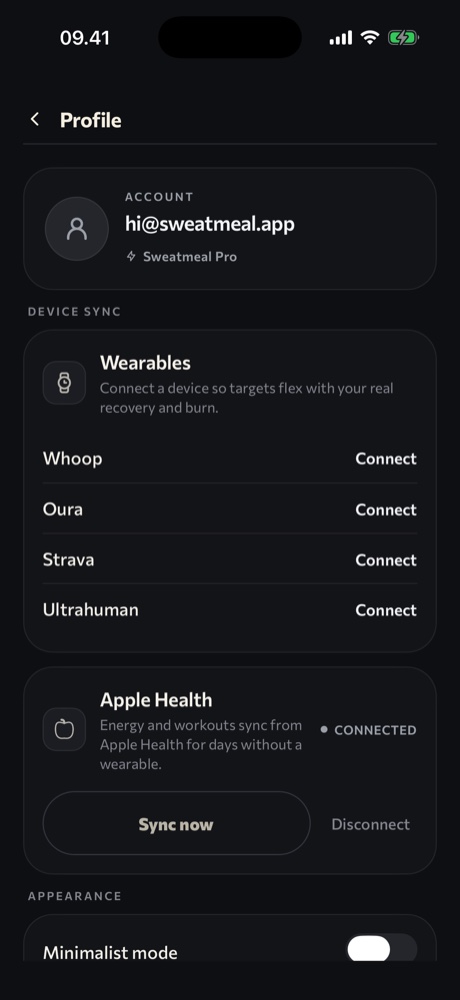
Open Sweatmeal and go to your profile.
-
Under Device sync, tap Connect next to Strava.
-
Sign in on Strava's page and approve access. You return to Sweatmeal automatically.
-
Sweatmeal confirms the connection and pulls your activities. Tap Sync wearables to pull a session you have just finished.