A nutrition app that syncs with Whoop
Connect your Whoop and Sweatmeal builds today's calories and macros from what your body actually did: the day's burn, your recovery score and the sessions you trained.
What Sweatmeal reads from Whoop
- Daily calorie burn
- Your Whoop's whole-day figure, resting energy included. For a finished day it is used as the measured burn. For today, which is still in progress, Sweatmeal adds your resting burn to the activity Whoop has recorded so far.
- Recovery score
- The 0 to 100 score for the day. It is optional: without it the target simply is not adjusted for recovery.
- Workouts
- Each session with its type, start and end time, calories and heart rate. These decide whether today counts as a hard day or a rest day.
Sleep and strain are not used. Nothing is written back to Whoop.
How it becomes today's target
A measured burn is the strongest input Sweatmeal can have. With Whoop connected, the day's energy comes from your device rather than an equation, and the app labels it as measured instead of estimated.
Your goal sets a daily deficit or surplus, then training cycles it: smaller on hard days, bigger on rest days. Whoop's workouts tell the app which kind of day it is. If you are cutting and your recovery is low, the deficit is eased further.
Protein and fat are anchored to a fat-adjusted weight, and carbs are what is left: the energy the session earned. Why Whoop and a calorie app often disagree is covered in the post linked below.
The full logic is on the methodology page: your goal sets a deficit or surplus, the day's training shapes it, and the target never drops below your resting metabolic rate.
Connect Whoop
-
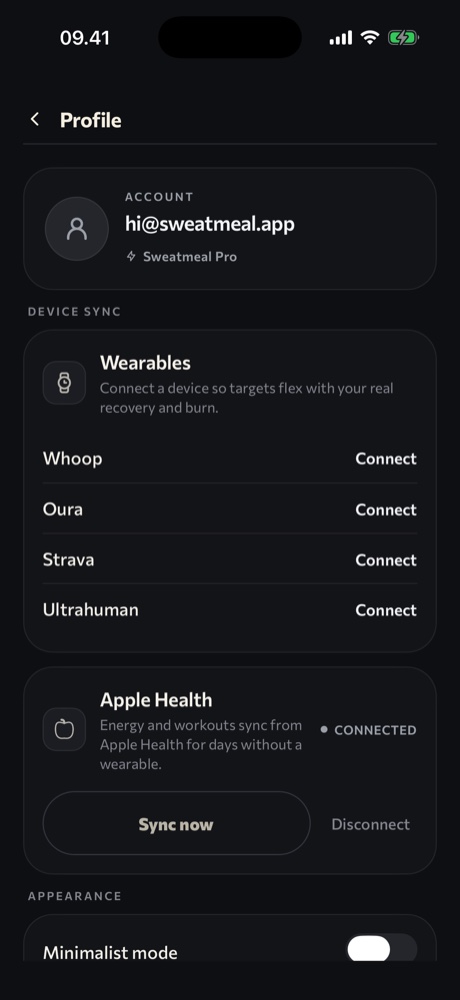
Open Sweatmeal and go to your profile.
-
Under Device sync, tap Connect next to Whoop.
-
Sign in on Whoop's page and approve access. You return to Sweatmeal automatically.
-
Sweatmeal confirms the connection and starts pulling your recovery, workouts and burn. Tap Sync wearables any time to pull again.
You will also see Whoop listed during onboarding. That step is only a preview; the connection itself is made from the profile screen.